
ILX Structures: 3D structural analysis and design in your browser
Model the whole building as a frame, with plates, shells and solids where you need them. Run static, P-Delta, buckling, modal, response spectrum, time history and pushover analysis, design steel, concrete, wood and masonry members to the current codes, and print a report you can hand to a reviewer. Built by an engineer, for engineers.
No card needed. Every analysis, every design code and reports for 30 days. Not ready yet? Get a free sample report.
- Written and checked by a licensed engineer
- Over 1,000 automated checks on every release
- ASCE 7-22, AISC 360-16, AISC 341-22, ACI 318-19, NDS 2018, TMS 402-16
What it does
From the first grid line to the finished report
One model for the whole job: geometry, loads, every analysis and the design of every member, in your browser.
Frame-first, finite elements underneath
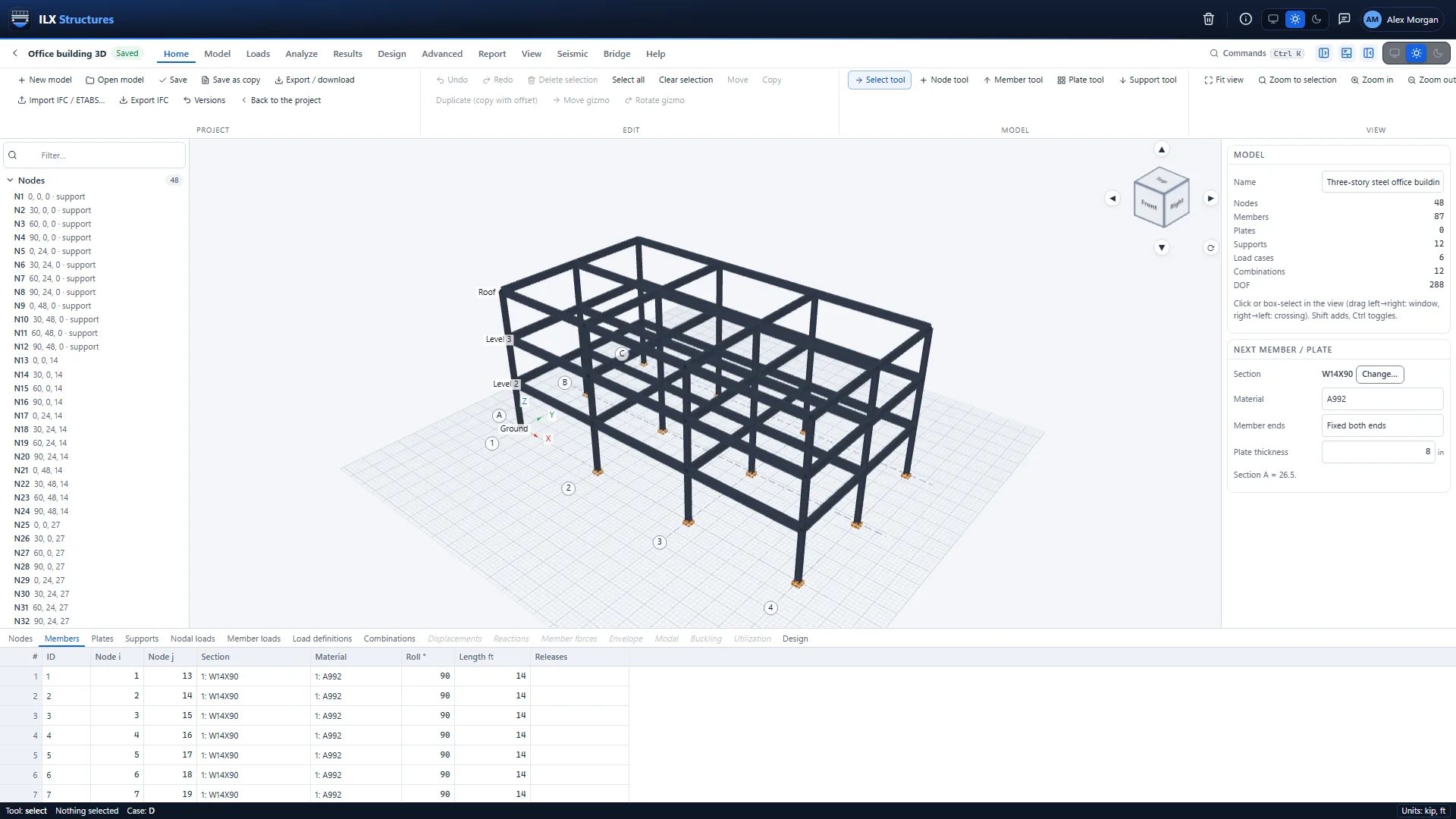
Draw beams, columns and braces on grids and levels; add slabs and walls as plates. The full finite-element engine handles shells, solids and heat flow when you need it.
Every analysis you need
Static and P-Delta, buckling, modal, response spectrum, time history and pushover, plus nonlinear, staged construction, vibration and progressive collapse checks.
Design to the current codes
Steel to AISC 360-16 and AISC 341-22, concrete to ACI 318-19, wood to NDS 2018 and masonry to TMS 402-16, with least-weight optimisation of steel members.
ASCE 7-22 loads, generated
Wind, snow with drifts, and seismic forces from the site's location, with LRFD and ASD load combinations made for you.
Big models, no waiting
Heavy runs go to the server as background jobs with progress and a Cancel button; large models solve on the GPU.
Reports and hand-off
A calculation report you can hand to a reviewer, results tables to CSV, and member forces sent straight to ILX Connection and ILX Calcs.
Capabilities
Everything in one program
One plan unlocks every analysis, every design code and every export. No modules to buy.
-
Modelling
Nodes, members and plates · Grids and levels · Supports and springs · Member releases and offsets · Rigid links and diaphragms · Sections and materials · Generators · Model check
-
Finite elements
Plates and shells · Solids · Axisymmetric models · Heat flow · Mesh import · Section cuts
-
Static and stability
Linear static · P-Delta · Linear buckling · Nonlinear buckling · Direct analysis support · Story drift and deflection checks
-
Dynamic and seismic
Modal analysis · Response spectrum · Equivalent lateral force · Time history · Harmonic, transient and random vibration · Floor vibration
-
Nonlinear and specialty
Pushover · Material nonlinear · Contact and gaps · Progressive collapse · Staged construction · Influence lines, fatigue and blast
-
Steel design
Members to AISC 360-16 · Seismic frames to AISC 341-22 · Composite beams · Stability · Least-weight optimisation · Drift
-
Concrete, wood and masonry
Concrete to ACI 318-19 · Wood to NDS 2018 · Masonry to TMS 402-16 · One place for every check
-
Loads
Load cases · Member, area and point loads · Self-weight, temperature, settlement, prestress · Wind · Snow · Seismic · Combinations
-
Import, export and hand-off
Import · Export · Hand-off to ILX Connection · Hand-off to ILX Calcs
-
Reports
Model and loads · Results · Design · Results tables · Your title block
-
In the browser
Projects and versions · Background jobs · GPU acceleration · Units your way · Light and dark · Support in the app
Results and design
See how the structure works
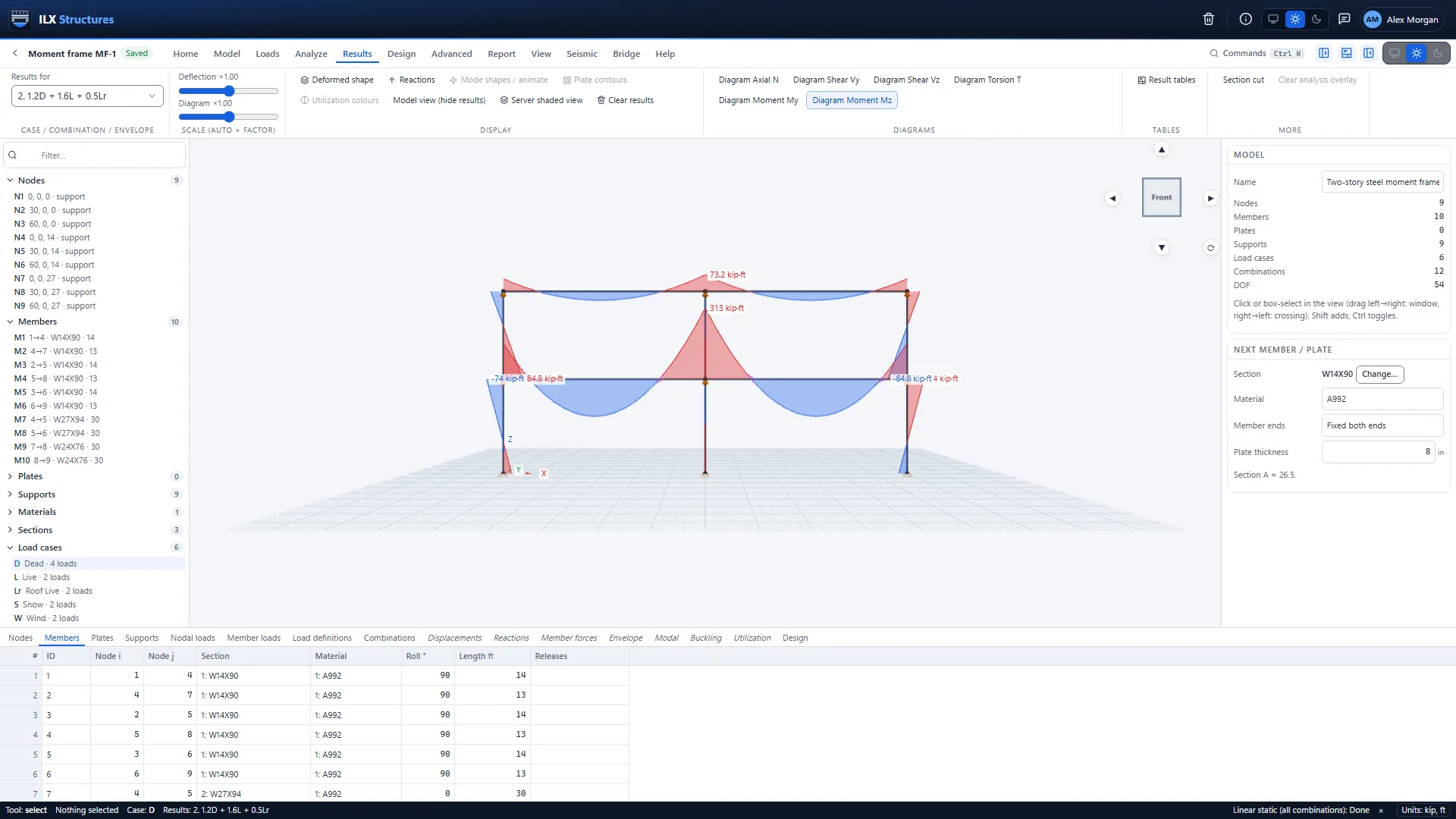
Deformed shapes, force diagrams, mode shapes and plate contours in the 3D view, and every member colored by its design ratio. Open any member for the checks behind the color.
- Envelopes of every load combination, LRFD or ASD
- The governing check of every member, with its clause and combination
- Least-weight optimisation of steel members, reviewed before it is applied
- A calculation report with your title block, and results tables as CSV
Learn it in an afternoon
Step-by-step tutorials
Short, practical walkthroughs, from a first frame to a pushover analysis.
Tutorial 1 · 20 min
Your first frame
Set up a project, draw a two-story steel frame on grid lines and story levels, give it sections and supports, run it, and read the results.
Tutorial 2 · 20 min
Loads and load combinations
Create dead, live, snow and wind load cases, apply member, area and point loads, generate wind and snow loads to ASCE 7-22, and make the LRFD and ASD combinations.
Tutorial 3 · 30 min
Seismic: equivalent lateral force and response spectrum
Look up the site's seismic design values, apply equivalent lateral forces, run a modal analysis and a response spectrum analysis scaled as ASCE 7-22 requires, and check story drift.
Tutorial 4 · 25 min
Member design and optimisation
Check every steel member to AISC 360-16, read the governing check and its clause, let the optimiser find lighter sections, and design concrete and wood members.
Tutorial 5 · 25 min
Plates and shells: slabs and walls
Add a slab and a shear wall as plate elements, mesh them, load the slab, and read deflections, plate contours and the total forces across a section cut.
Tutorial 6 · 30 min
Pushover analysis
Assign plastic hinges to ASCE 41-23 and AISC 342-22, push the frame to its target displacement, and read the capacity curve and the hinge states.
Tutorial 7 · 15 min
Reports and hand-off
Set your title block once, print the calculation report, download the results tables, and send member forces to ILX Connection and ILX Calcs.
Verification
Tested on every change
Every release passes over 1,000 automated checks: closed-form solutions, textbook benchmarks, published code examples and whole-model regression tests, run on every change.
How ILX Structures is tested, with the example problems →
ILX Studio, LLC is not affiliated with or endorsed by AISC, ACI, AWC, TMS, ASCE or any other code organization.
Works with ILX Connection and ILX Calcs
From the frame to the connection
Send a member's end forces to ILX Connection to design its connection, or to ILX Calcs for a detailed member calculation. No retyping, no transcription errors.
Pricing
One plan, everything included
Try everything free for 30 days. Then keep going for $75 a month, $600 a year, or $500 a year on the 3-year founder plan (until December 31, 2027), per user.
ILX Structures works in your browser; nothing to install. Models are saved and analysed on ILX Studio's servers.
FAQ
Questions engineers ask
What is ILX Structures?
3D structural analysis and design in your browser. You build a model of the structure from grids, members and plates, apply loads, run the analysis and check the members to the design codes, then print a calculation report.
Do I need to install anything?
No. Sign in from your browser and start modelling. Your projects are saved on the server, so you can pick up where you left off on any computer.
Which analyses does it run?
Linear static, P-Delta, linear and nonlinear buckling, modal, response spectrum, time history and pushover, plus material nonlinear, contact, progressive collapse, staged construction, vibration, influence lines, fatigue, blast and section cuts. Plates, shells, solids, axisymmetric and heat-flow models use the same engine.
Which design codes are included?
Steel to AISC 360-16 and the seismic provisions of AISC 341-22, concrete to ACI 318-19, wood to NDS 2018 and masonry to TMS 402-16, with ASCE 7-22 loads and load combinations.
How big can my models be?
Heavy runs go to the server as background jobs with progress and a Cancel button, so your browser never freezes; large models are solved on the server's graphics processor when that is faster.
Can I bring in my existing models?
Yes. ILX Structures imports DXF, IFC, ETABS text files (.e2k), STEP and IGES geometry, and Gmsh, Abaqus and UNV meshes. It exports its own .ilxs file, DXF, IFC, results tables and PDF reports.
Does it work with ILX Connection and ILX Calcs?
Yes. Send a member's forces to ILX Connection to design its connection, or to ILX Calcs for a detailed member calculation.
How do I know the results are right?
Every release passes over 1,000 automated checks against closed-form solutions, textbook benchmarks, published code examples and complete regression models. The Verification page lists the method and the example problems.
Who is responsible for the design?
You are. ILX Structures is a design aid: the engineer of record reviews and approves every model, result and report. See the Disclaimer.
What happens after the free trial?
New accounts get 30 days free, with every feature. After that, it is $75 per month or $600 per year, per user, at founder pricing. One plan unlocks everything.
Model your next structure today
Free for 30 days. Nothing to install.